Custom email reports
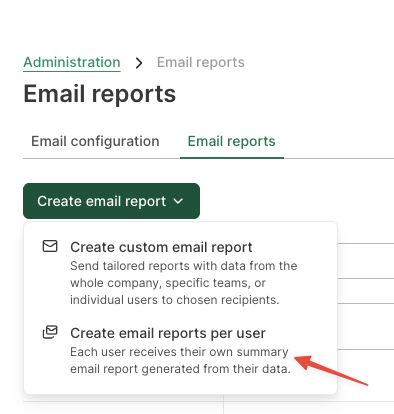
You can create a new email report in Administration, Email reports.
ManicTime Cloud and Server can send daily, weekly, monthly, or yearly email reports. You can configure email reports to send an email for:
- whole organization
- specific team
- specific user
There are three reports available:
- Summary - A summary report with various data
- Arrive late / Leave early violations report - A list of users who arrived too late or left too early based on settings in Administration, Site settings, Work time
- Overtime violations report - A list of users whose total work time falls outside the defined overtime threshold, based on the settings in Administration, Site settings, Work time. For example, if the work time is set to 8 hours per day and the email is sent on a weekly basis, then the expected total is 40 hours per week. If the threshold is set to 5, the report will include all users who worked less than 35 hours or more than 45 hours. If the email is sent on a daily basis, then using a 1-hour threshold may make more sense — it would report all users who worked less than 7 hours or more than 9 hours.
All values in the report link back to the site, so you can do further analysis.
Email reports per user
Use this option when you want each user to receive their own summary email report generated from their own data.
An administrator can configure this once for all users, rather than creating a separate report for each person. Each recipient receives a report based on their own data.