The data retention feature tells ManicTime to delete old automatically tracked data from ManicTime Server and from connected clients as they sync. Use it when your organization has a rule for how long tracked activity data should be kept.
This is different from limiting report visibility. Report limits only hide older data from reports. With data retention enabled, ManicTime deletes the data. Once ManicTime deletes the data, it cannot be recovered from ManicTime.
Data retention: delete old tracked data
Requirements
- ManicTime Server v2026.2.1 or newer
- ManicTime clients v2026.2 or newer
Update connected clients before relying on the policy across all devices. Older clients may not apply the retention policy locally.
What data is deleted
The feature deletes automatically collected activity history, such as:
- Computer usage
- Application timelines
- Document timelines
It does not delete user-created tags or tag timelines.
Configure data retention
Go to Administration -> Site settings -> Data Retention.
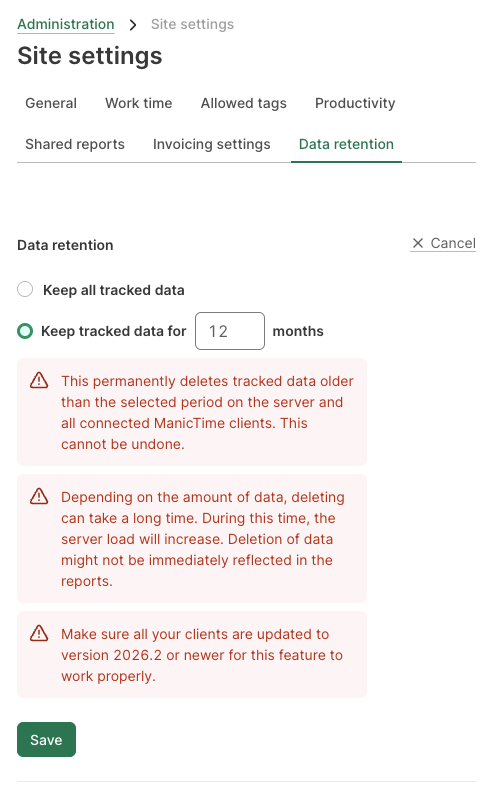
Choose one of these options:
- Keep all data - ManicTime keeps tracked data indefinitely. This is the default.
- Keep tracked data for N months - ManicTime deletes automatically tracked data older than the selected number of months.
The setting is server-wide. It is not per-user or per-team. Once enabled, it applies to automatically tracked data for everyone on the server.
How cleanup works
ManicTime periodically checks for automatically tracked data older than the configured retention period. It deletes old activities and compacts the timeline history, so deleted data is not just hidden from reports but removed from the retained working history.
The cleanup runs in the background. If the server has a lot of historical data, the first cleanup can take some time because ManicTime processes old data gradually. After that, cleanup becomes routine maintenance.
Connected clients receive the cleanup during synchronization and apply it to their local databases. Offline devices catch up when they reconnect.
If a client does not connect for more than 30 days, ManicTime Server will start deleting old data from the server copy of that client's timelines. This prevents old data from staying on the server forever just because a device stopped syncing.
Important notes
- Deleted data cannot be restored from ManicTime. Choose a retention period that still covers reporting, billing, audits, and any other legitimate need to look back.
- Backups and exports are separate. If your organization keeps database backups, exported reports, or copied files for longer periods, those need their own retention rules.
- Enabling data retention can help support privacy and compliance policies, but it does not by itself make an organization compliant. Choose the retention period based on your legal, contractual, and internal requirements.
Limit report visibility without deleting data
If you only want to hide older data from reports, use the activity report limits instead of data retention. These settings do not delete data from the database.
To show only the last 90 days of data, add activityReport.maxAge to ManicTimeServerSettings.json:
{
  "activityReport": {
    "maxAge": 90
  }
}
To show data only from a specific date, use activityReport.minDate:
{
  "activityReport": {
    "minDate": "2021-01-01"
  }
}
You can also use both settings:
{
  "activityReport": {
    "minDate": "2021-01-01",
    "maxAge": 90
  }
}
When both settings are configured, the more restrictive limit is used.